


TREK: Sounds [Pro]
4.4282.00 Reviews
App Specs
- Version
- 13.0
- Updated On
- License
- $2.49
- Downloads
- 10,000+
- Developer
- NSTEnterprises
- Categories
- Personalization
- Platform
- Android
Screenshots
 Analysis by AppCompare
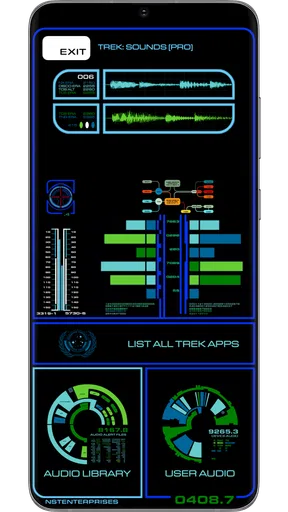
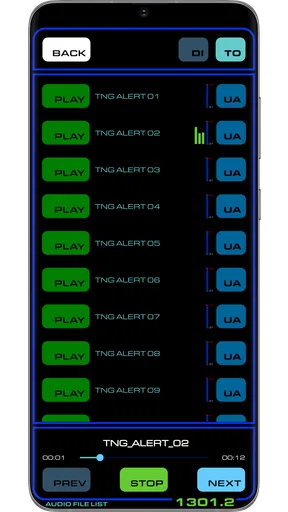
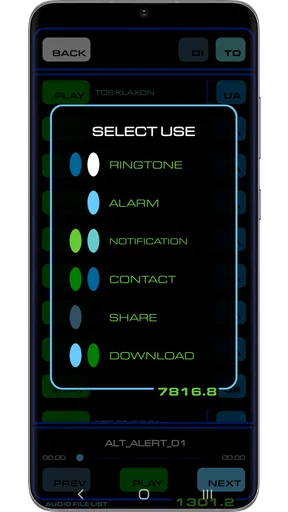
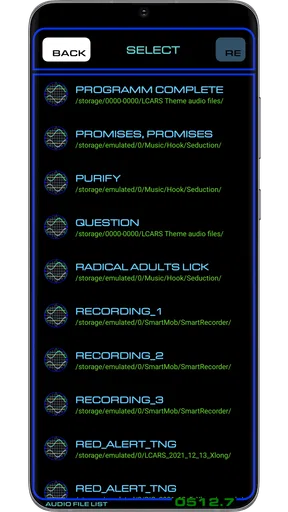
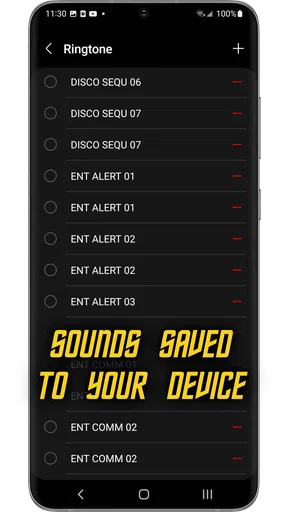
I approached TREK: Sounds as a small personalization tool rather than a full entertainment app. Its purpose is straightforward: it lets me use recognizable science-fiction-inspired sounds for ringtones, alarms, and notifications, while also giving me the option to work with sounds I already have. That narrow focus is important. If you want a huge general ringtone library, this is not trying to be that. If you want your phone to feel more personal without replacing the rest of your device’s sound controls, it has a clear reason to exist.
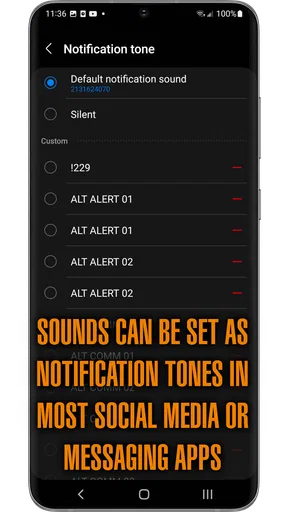
Developed by NSTEnterprises, the app sits in the personalization category and is aimed at people who enjoy a particular sci-fi atmosphere. I found the appeal strongest when I treated it as a way to assign meaning to different alerts: one sound for calls, another for messages, and something more noticeable for an alarm. The result is more useful than simply making the phone louder, because the sound itself can tell me what kind of interruption is waiting.
What to consider before choosing it
The first decision is whether you want character or variety. Standard phone settings usually provide a collection of neutral tones, while broad ringtone apps tend to emphasize quantity. This app makes a different trade-off by concentrating on iconic sci-fi-style sounds. That focus can be a strength if the theme matches your taste, but it also means the experience will feel specialized rather than universal.
I would also consider how often you change sounds. Someone who picks one ringtone and leaves it in place may only need a simple sound selector. Someone who likes to separate work calls, personal messages, reminders, and alarms can get more value from having a themed set available in one place. The ability to use your own sounds matters here because it gives the app a role beyond its built-in identity.
Compatibility is another practical point. The app requires Android 7.0 or later, so it is suited to devices running a relatively modern version of Android, but an older phone should be checked before purchase. It is marked for Everyone, which fits the uncomplicated nature of the content and its use as a device-personalization utility.
The price is $2.49. I see that as a decision about convenience and taste rather than necessity. Android already includes basic ringtone and notification controls, so nobody needs this app merely to make a phone ring. The purchase makes more sense for a fan who specifically wants the themed sound collection and prefers a focused tool over searching through unrelated audio apps.
At the time of my review, the app is on version 13.0. It has an average rating of 4.4 from around one thousand ratings, with roughly two hundred eighty reviews, and has passed ten thousand installs. Those figures suggest a small but established audience rather than a mass-market utility. I would read that as evidence of a clearly defined niche, not as a promise that every Android setup will behave identically.
Worth Reading Before You Choose

EA SPORTS FC Mobile 26 Is a Bigger Football Game, but It Takes Time

Flipboard Shows What News Apps Must Do Beyond the Feed

Switching to Android Auto Means Rethinking Your Driving Routine

Google Calendar Makes a Crowded Week Easier to Manage

Ludo King Makes the Most of the Minutes Between Plans

Baby Panda World Brings Quick Play to Modern Phones, but Its Game Library Feels Busy
How I would set it up for daily use
I would begin with the sounds I genuinely expect to hear often. A ringtone needs to remain recognizable after repeated use, while a notification can be shorter and less intrusive. For alarms, I would avoid choosing something that is pleasant but too easy to ignore. A dramatic sound may be fun initially, yet the best alarm choice is the one that reliably gets my attention without making every morning unpleasant.
A useful workflow is to assign sounds by purpose instead of by novelty. I might use a distinctive sci-fi tone for incoming calls, a quieter option for routine notifications, and a stronger selection for an alarm. This creates an audio hierarchy. Even when the phone is in another room, I can often tell whether I need to check it immediately or whether it is only a minor alert.
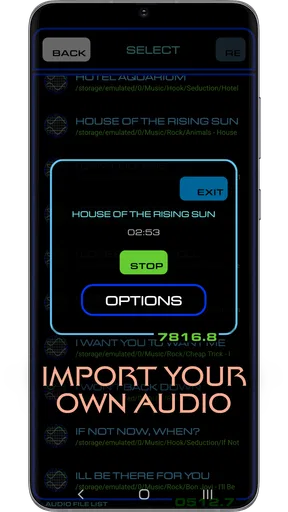
The option to use personal sounds adds another layer. I would keep the themed sounds for the alerts where I want a recognizable identity, then use my own audio for something more private or practical. That mixed approach is better than forcing every sound into the same style. It also means the app can remain useful after the novelty of the built-in collection has faded.
One small but important habit is to test each assignment in the environment where it will be used. A notification that sounds clear in a quiet room may disappear in a busy street. A ringtone that seems amusing at home may be too conspicuous in an office. I would check volume, length, and how quickly I can identify it before making the sound part of my routine.
Where the focused sci-fi approach works best
The strongest part of this app is its sense of identity. Many ringtone tools feel like warehouses of unrelated clips, and the effort of browsing can outweigh the benefit of changing a sound. Here, the theme gives me a starting point. I am not choosing from an entirely random catalog; I already know the kind of atmosphere I want.
That makes it particularly suitable for fans who want their phone to reflect a hobby without changing the wallpaper, launcher, or entire visual theme. A sound is also more discreet than a large visual customization package. I can enjoy the connection when an alert arrives, while the phone still looks and behaves like a normal Android device.
Another advantage is the separation between different alert roles. The app is not only about a ringtone in the narrow sense. Its value increases when I use it across calls, alarms, and notifications, because the phone becomes easier to interpret by ear. I found that more practical than repeatedly changing a single ringtone just for entertainment.
The own-sound option is a particularly useful safeguard against the limits of a themed collection. If I have a personal recording, a familiar audio file, or a sound that better suits a specific reminder, I can keep that choice instead of abandoning the app altogether. This flexibility makes the purchase less dependent on liking every included sound equally.
I also think the app suits a secondary-device scenario. On a spare Android phone, a media device, or a phone used for a specific routine, a distinct alert scheme can make that device immediately recognizable. I would not recommend buying it solely for that purpose, but it is a good example of how a focused personalization app can solve a small everyday problem.
Concrete situations where it earns its place
Imagine working from home with the phone on a desk while preparing lunch. A normal notification tone may not tell me whether I received a message, a call, or an unrelated system alert. With separate sounds assigned to each role, I can decide whether to stop what I am doing. The benefit is not louder audio; it is quicker recognition.
For a commute, I would choose a ringtone that cuts through background noise without being painfully sharp. I would reserve a different sound for messages so I do not reach for the phone every time someone contacts me. The themed style adds personality, but the real improvement comes from making the alerts distinguishable.
For an alarm, I would use a sound that has enough presence to wake me and then review the choice after a few mornings. A dramatic sci-fi effect can be motivating for some people and irritating for others. This is a good example of where personal testing matters more than a store description. The app provides the material; I still have to choose responsibly.
Families may also find a simple use for it when several Android phones are nearby. Giving each device a different alert style can reduce confusion, especially when calls and messages arrive at similar times. The Everyone content rating makes the app approachable for general household use, although the themed appeal will naturally depend on the listener.
Limitations I noticed in the concept
The focused theme can become a limitation if your taste changes or if you want sounds that blend into a professional setting. A recognizable science-fiction tone may be perfect at home but less appropriate during a meeting, in a classroom, or in a quiet public space. I would be selective about which alerts use the most distinctive sounds and keep a neutral alternative available when discretion matters.
There is also a difference between having sound files and having a complete automation system. I would not choose this app expecting advanced scheduling, contact-based rules, or a fully redesigned notification manager. Its role is to provide audio choices and help personalize common alert types. If the main goal is complex automation, a dedicated system tool is likely a better match.
Android device makers can organize sound settings differently, so the final selection process may not feel identical on every phone. That is not unique to this app, but it is worth remembering before expecting a one-tap transformation of every alert. I would allow a few minutes to confirm that the chosen sound is assigned to the intended category and behaves correctly when the device is muted or set to another mode.
The price also creates a real trade-off. Free ringtone apps may offer more browsing space, although they often make the user work harder to find something coherent. The built-in Android sounds cost nothing and are easier for someone who wants a purely functional setup. Paying for this app is justified mainly by the theme, the convenience of a focused collection, and the ability to combine it with personal audio.
How it compares with the usual alternatives
Compared with the default Android sound picker, this app is more expressive but less essential. The default option wins when reliability and simplicity are the only priorities. I would stay with the built-in controls if I rarely change alerts, dislike themed sounds, or only need a quiet standard tone.
Compared with broad ringtone libraries, TREK: Sounds is narrower and easier to approach for the right audience. A large catalog may be better if I want pop clips, nature sounds, comedy effects, or constantly changing choices. This app is better when I already know that science-fiction audio is the direction I want and do not want to sift through unrelated material.
Compared with full phone-theme packages, it is less disruptive. I can personalize the audio layer without committing to a new launcher, icon set, wallpaper style, or visual interface. That makes it a sensible middle ground for someone who wants a recognizable touch rather than a complete makeover.
Compared with using only personal audio files, the app offers a more immediate themed starting point. Personal files provide the greatest control, but they also require preparation, organization, and testing. I would choose my own files when I have a very specific sound in mind; I would choose this app when I want a ready-made sci-fi direction and the option to supplement it.
The real cost of switching
Switching from default sounds is not technically a major commitment, but it does require a little attention. I would note which alerts I currently recognize, decide which ones actually need changing, and avoid replacing everything at once. Changing one category at a time makes it easier to identify whether a new sound is useful or merely novel.
The bigger cost is habit. If I assign an unusual tone to an important alert, I need to learn that association. During the first few days, I might still check every sound automatically. The benefit arrives when the new pattern becomes familiar and I can distinguish alerts without looking at the screen.
There is also a social cost to consider. A sound that is entertaining among friends can be distracting around colleagues or strangers. I would use the most recognizable effects selectively and keep the volume moderate. Personalization works best when it expresses my taste without turning every notification into a public announcement.
Because the app supports personal sounds, switching does not have to be all or nothing. I can keep a familiar alarm, add a themed ringtone, and use a quieter personal file for messages. That gradual approach lowers the risk of regretting the purchase and helps reveal whether the app is genuinely improving my routine.
Who should choose it, and who should skip it
I recommend it to Android users who enjoy sci-fi sound design, want more personality than the standard sound set, and appreciate having choices for calls, alarms, and notifications in one focused place. It is especially appealing if you prefer a coherent theme over a massive, unfiltered catalog.
I would also recommend it to someone who wants a small customization purchase rather than a complete phone makeover. The app can add character while leaving the rest of the device untouched. The ability to include personal sounds makes it more adaptable than a collection that only works within one narrow preset style.
I would skip it if I am satisfied with the default Android tones, if I need a large selection across many unrelated genres, or if I am looking for automation rather than sound personalization. I would also think twice if my phone is running an Android version below 7.0, since the stated minimum requirement makes compatibility an immediate concern.
For me, the deciding question is simple: will I actually use the sounds often enough to notice the difference? At $2.49, the purchase is modest, but it still needs to solve a real preference. If the answer is yes, the focused theme is more valuable than a generic free collection. If the answer is no, the built-in settings already cover the basic job.
My recommendation after using it
TREK: Sounds is a specialized personalization app with a clear audience and a sensible middle ground between default Android tones and oversized ringtone catalogs. I like that it treats calls, alarms, and notifications as separate opportunities for customization, while still allowing me to bring in sounds of my own.
My recommendation is positive for sci-fi fans who want their phone to have an audible identity and who are willing to spend a little time choosing sounds that fit real situations. I would start with one ringtone and one notification, test them at home and outdoors, and only then build a larger sound scheme. That approach keeps the fun while avoiding alert fatigue.
It is not the right purchase for everyone, and its narrow theme is both its main attraction and its main boundary. Still, when the style matches your taste, the app offers something the standard sound picker cannot: a consistent atmosphere that can make ordinary phone interactions feel more personal. For that specific purpose, I think it is a worthwhile choice.
Pros
- Immersive soundscapes create a calm atmosphere for relaxation or focus.
- Simple interface makes browsing and starting tracks quick and effortless.
- High-quality audio helps the environmental recordings feel natural and detailed.
- Useful for meditation
- sleep routines
- reading
- or background concentration.
- Pro version offers a focused experience without distracting social features.
Cons
- The sound library may feel limited if you want frequent variety.
- Some tracks can become repetitive during extended listening sessions.
- A stable connection may be needed depending on how audio is delivered.
- Limited customization may disappoint users wanting detailed sound mixing.
- The app’s niche design is less suitable for users seeking music or podcasts.
FAQs for TREK: Sounds [Pro]
What is TREK: Sounds [Pro] and what can I use it for?
TREK: Sounds [Pro] is an audio-focused application designed to provide an immersive listening experience, typically through atmospheric soundscapes, ambient effects, or curated audio content. It may be useful for relaxation, concentration, sleep, travel, or creating a particular mood. Before downloading, users should check the app description and screenshots to confirm which sound categories and playback features are included in the current version.
What does the Pro version of TREK: Sounds include?
The Pro edition is generally intended to offer a more complete experience than a free or standard release. Depending on the version available on your device, it may include additional sound content, fewer or no advertisements, expanded customization, background playback, or access to premium settings. Because included features can change with updates, review the store listing carefully and verify whether Pro is a one-time purchase or connected to an in-app subscription.
Does TREK: Sounds [Pro] work offline?
Offline functionality depends on how the application stores its audio files. Some sounds may be available immediately after installation, while others might need to be downloaded first or could require an internet connection for streaming, licensing checks, or updates. If offline listening is important to you, look for download controls inside the app and confirm that saved sounds continue playing when mobile data and Wi-Fi are disabled.
Can I use TREK: Sounds [Pro] while using other apps or when the screen is locked?
Audio applications are often used in the background for activities such as studying, sleeping, commuting, or meditation, but background playback is not guaranteed on every device. Android and iOS battery-saving settings can also stop playback unexpectedly. After installation, test whether TREK: Sounds [Pro] continues playing with the screen locked and whether it provides controls through notifications, the lock screen, or the device’s media panel.
Is TREK: Sounds [Pro] safe, private, and compatible with my device?
Before installing, check the official Google Play or App Store listing for the supported operating-system version, developer information, update history, permissions, and privacy disclosures. A sound app should not normally require extensive access to personal data, contacts, or unrelated device functions. Also review user feedback for reports about crashes, battery consumption, or audio problems, particularly if you use an older Android or iOS device.


